Your team runs automated tests in CI every day. The results live in pipeline logs and the bugs live in Jira. The product owner then asks: can we release on Friday? The World Quality Report 2025 by Capgemini and OpenText found that 89% of organizations pilot or deploy GenAI in quality engineering, and 64% name integration complexity as a top barrier. This guide explains the classic quality management tools and shows how you can apply them to test data.
What Are Quality Management Tools?
Quality management tools are methods and software that collect quality data and keep a process under control. Software teams apply them to test results and defects.
The term covers analysis methods and software. Analysis methods are charts and diagrams that help identify patterns in data and find the root cause of quality problems. Kaoru Ishikawa, a Japanese quality expert, described the basic quality tools in his book Guide to Quality Control, and the American Society for Quality (ASQ) keeps the same list today. Software means quality systems: a quality management system (QMS) in manufacturing, or a test management platform with a defect tracker in software delivery.
Where Teams Use Quality Management Tools
The methods are older than the software and they work in every industry:
- Process improvement. Six Sigma and total quality management (TQM) use them for process improvement.
- Manufacturing and supply chain. Lean manufacturing and supply chain management teams apply them as quality control tools.
- Project management. The Project Management Institute lists them as quality management tools in project management.
- Quality standards. ISO 9000 defines the quality management principles, and continual improvement is among them.
- Software delivery. QA managers use them to show stakeholders the overall quality of the product and the areas of improvement.
A test run report shows the result of today. A quality tool shows the trend and the cause. Quality assurance improves the process and quality control checks the product, and the tools below serve both sides. The input is software testing quality metrics such as success rate and defect density.
Basic Quality Management Tools For Software Teams
The basic quality tools are the fundamental tools of quality control, and each tool answers a different question about your process or product. Using quality management tools in software follows the same logic as in a factory: the method is applied to quality data, and test runs provide that data. Quality issues usually need several tools in sequence. A check sheet comes first and a Pareto chart follows. The description of each tool explains the method and shows practical applications in software testing with the data source for each.
Check Sheet
A check sheet is a form used to collect data by category at the moment an event happens. Ishikawa listed it first because every other tool needs the data it collects. An inspector in a factory adds a tally mark for each defect type. The check sheet of a software team is the record used to track failed tests per module per run, or the list of defects per severity per sprint. You need this data before you can build Pareto charts or control charts. The run report and the bug tracker collect it for you. A defect board that links each bug to the failed tests keeps the tally current, and defects tracking in Jira lists every affected test under the defect.
Pareto Chart
A Pareto chart is a graphical tool used to prioritize: a bar chart sorted from the most frequent category to the least frequent, with a line graph that shows the cumulative percentage. The chart is based on the Pareto principle, named after the economist Vilfredo Pareto: a small share of causes produces most of the effects. The classic rule says 20% of the causes produce 80% of the problems. A software team uses the Pareto chart to prioritize. You can group the failures of the last month by cause: product bug, test data, environment, timing. The chart usually shows that a few causes produce most failures, and the team fixes those first. Test report analytics by suite or by tag gives you the counts, and the Defects report in Analytics shows which tests an open bug blocks.
Fishbone Diagram
A fishbone diagram, also called an Ishikawa diagram or a cause-and-effect diagram, is used for root cause analysis. The diagram is used to identify possible causes of a problem: the problem sits at the head of the fish, and each bone holds a group of causes. The team asks why under each bone until it finds the root cause. A software team draws the diagram for a release blocker or for a flaky test. A flaky test fails and succeeds with the same code. Typical bones are code and test data. Environment and timing complete the diagram. The data source is the stack trace of each failure plus the change history of the code. AI failure clusterization in Testomat.io groups automated test failures by error pattern, so you can start the diagram from grouped potential causes instead of raw logs.
Histogram
A histogram is a bar chart that shows the distribution of a measured value. The height of each bar shows how many values lie in each range. A histogram helps quality managers see the shape of the data: a normal curve or a long tail. A software team plots test duration per test. The long tail shows the slow tests that hold the pipeline. A histogram of defect age shows how long bugs stay open and whether the process is consistent from sprint to sprint. Run history with duration per test gives you the data.
Control Chart
A control chart is a line graph of a value over time with a center line and upper and lower control limits. The data itself defines the limits, usually three standard deviations from the mean. The control chart is a tool used to monitor whether a process is in control. A point outside the control limits signals a special cause, and the team investigates it. Statistical process control (SPC) in manufacturing works on this chart. A software team plots the success rate of the regression suite by date. A drop below the lower limit means a real change in the product or in the environment. Normal variation stays inside the limits, so the team stops reacting to every small change. Flaky test detection uses the same logic per test: the analytics marks a test as flaky when its result changes more often than the limit you set in the Analytics settings of the project.
Scatter Diagram
A scatter diagram plots two variables as points on an x axis and a y axis. The pattern shows a correlation: points close to a line mean a strong relation, and a wide cloud means a weak relation. The diagram helps identify a link and the fishbone diagram then finds the cause. A software team uses it to test a theory. You can plot code changes per module on the x axis and defects per module on the y axis. A clear correlation tells you where to add tests first. The data source is the version control history and the bug tracker.
Flowchart
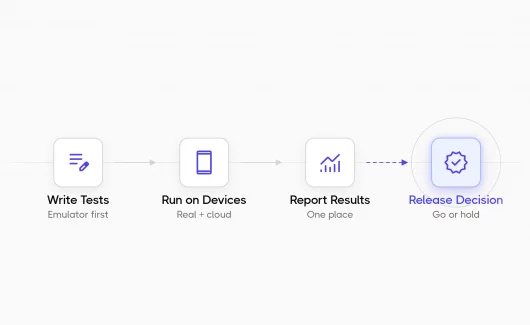
A flowchart is a map of the steps and decision points of a process. ASQ includes it in the current list of basic quality tools in place of stratification. The flowchart is the tool a team uses to understand a process before it measures the process. A software team draws the path from a requirement through test cases and runs to the release decision. The map shows where the process loses information, for example a requirement with zero linked tests or a failed run with zero linked defects. Requirements traceability keeps this map as live data instead of a drawing, and quality gates turn the decision points into rules the pipeline checks.
The table collects the tools with the question each tool answers and the data a software team needs for it.
| Tool | Question it answers | Data source in a software team |
|---|---|---|
| Check sheet | How often does each event happen? | Run reports and the defect tracker |
| Pareto chart | Which causes produce most failures? | Failure reasons from run history |
| Fishbone diagram | What is the root cause of this failure? | Stack traces and the change history |
| Histogram | How is this value distributed? | Duration per test, defect age |
| Control chart | Is the process in control over time? | Success rate by date, results per test |
| Scatter diagram | Do these two variables correlate? | Version control and the defect tracker |
| Flowchart | Where does the process lose information? | Requirement links and run results |
Bottom Line
The basic quality tools answer the release question with data: which causes produce most failures and whether the process is in control. The methods are simple, and the hard part for a software team is the data. You need run history in a connected system with defects and requirements to enhance quality release after release, and a spreadsheet loses that connection after the first release.
Testomat.io keeps that data in a test management project. Run reports and the Defects board collect the check sheet data. The Success Rate by Date widget gives you the control chart, and flaky test detection applies limits per test. AI failure clusterization groups failures for the fishbone diagram, and requirements traceability draws the flowchart as live data. You can also ask Chat with Analytics which areas have the highest failure rate and get the answer in plain language.
You can create a free project and send the first run from your CI. The analytics dashboard then shows the first chart. 👉 Try Testomat.io for free.